How to Test Your UI/UX Designs for Usability: The 2025 Step-by-Step Guide
We’ve all been there. You spend weeks polishing a UI, obsessing over pixel-perfect padding and color theory, only to launch and watch users struggle to find the “Checkout” button. In my experience working with startups, nothing is more humbling than watching a user fail to perform a task you thought was obvious.
The cost of this disconnect is massive. According to UserTesting’s 2024 Retail Benchmark Report, 41% of shoppers abandon a site due to simple navigation obstacles. Even worse, those encountering two or more issues are 34% less likely to ever return.
In 2025, guessing is the most expensive design strategy you can have. You cannot afford to rely on gut feelings when VWO reports that users form an opinion about your website in approximately 50 milliseconds.
This guide isn’t just theory. It’s a definitive, 6-phase framework tailored for the modern product landscape—incorporating the latest AI-augmented testing methods, QXscore metrics, and remote strategies to help you validate your designs before you write a single line of code.
Phase 1: Define Your Usability Metrics (The “Why”)
Before you recruit a single participant, you need to know what “success” looks like. In the early days, I used to just ask, “Did they like it?” That doesn’t cut it anymore. You need a blend of quantitative and qualitative data.
Why? Because the financial stakes are incredibly high. Forrester Research indicates that every $1 invested in UX brings $100 in return—a staggering ROI of 9,900%. But to prove that ROI to stakeholders, you need hard metrics.
Quantitative vs. Qualitative Goals
Quantitative data tells you what happened. This includes:
- Success Rate: The percentage of users who complete the task.
- Time on Task: How long it takes.
- Error Rate: How many times they clicked the wrong button.
Qualitative data tells you why it happened. This is where you dig into user sentiment, frustration levels, and verbal feedback.
The New Standard: QXscore
In 2024 and 2025, advanced teams are moving beyond basic metrics to the QXscore (Quality Experience Score). This metric combines behavioral data (did they do it?) with attitudinal data (how did they feel?).
According to UserTesting’s 2024 data, improving QXscore can deliver $226M in annual revenue across lower-performing retailers. If you aren’t measuring the quality of the experience alongside the mechanics of it, you’re leaving money on the table.

Phase 2: Choose Your Testing Method
The landscape of usability testing has shifted. While lab testing used to be the gold standard, the post-2024 trend heavily favors remote and hybrid approaches.
Moderated vs. Unmoderated Testing
Moderated Testing: You (the facilitator) and the user are on a call together. This is best for complex flows or early-stage prototypes where you need to probe deep into the user’s thought process. I prefer this for B2B software where the logic is dense.
Unmoderated Testing: Users complete tasks on their own time using tools like Maze or UserTesting. This is faster and cheaper.
New for 2025: AI-Augmented Testing
This is where things get interesting. We are seeing a rise in “Synthetic Users”—AI models trained on user personas to simulate testing.
However, a word of caution: Do not replace humans entirely. As John-David Lovelock from Gartner noted in July 2024, Generative AI is being felt across all technology segments… but to a software company, GenAI most closely resembles a tax. It’s a tool to speed up preparation, not a replacement for genuine human insight.
My recommendation: Use AI to write your test scripts and analyze the data (more on that later), but keep humans in the driver’s seat for the actual testing.
Phase 3: The “Rule of 5” & Recruitment
One of the most common questions I get is, “How many users do I need to test?” If you think you need 50 users to get valid data, I have good news for your budget.
Why 5 Users are (Still) Enough
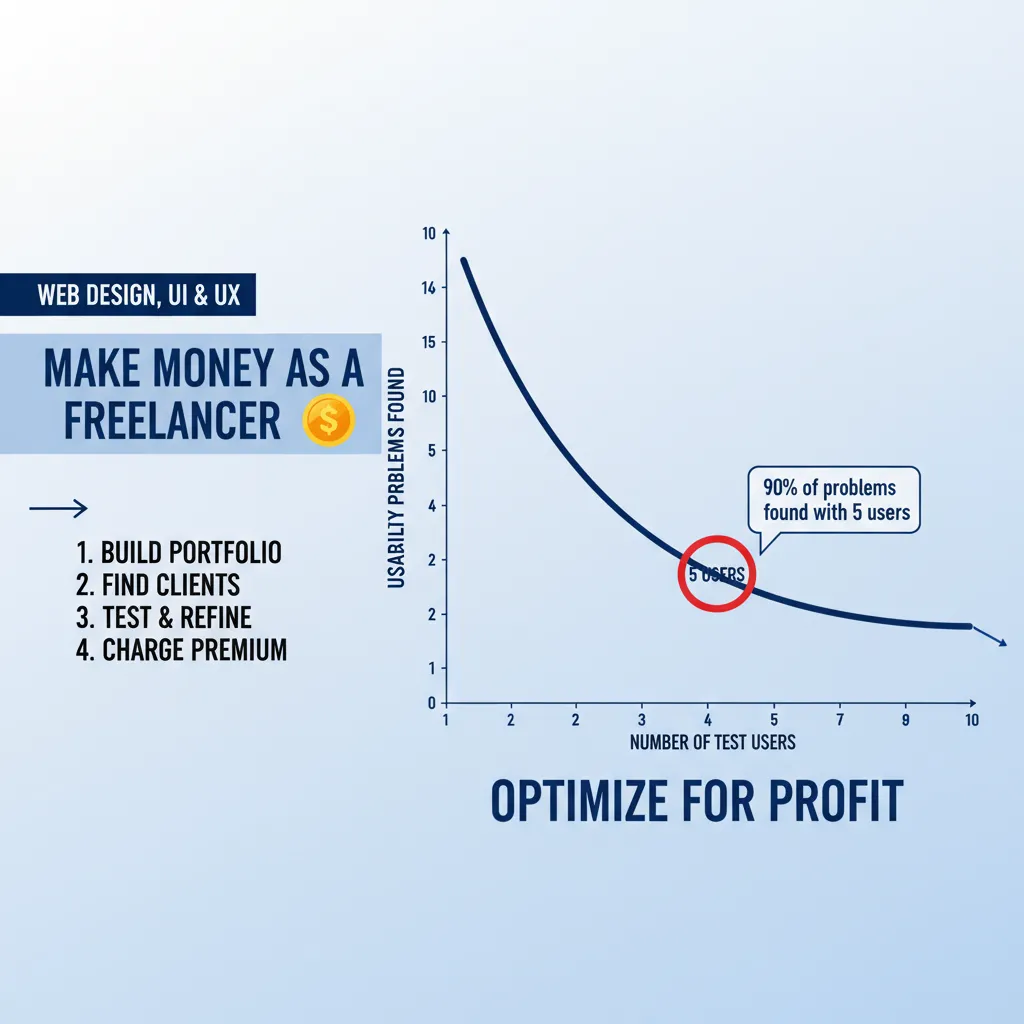
The industry standard, established by the Nielsen Norman Group and re-verified in 2024, is the “Rule of 5.”
“Elaborate usability tests are a waste of resources. The best results come from testing no more than 5 users and running as many small tests as you can afford.” — Jakob Nielsen
With 5 users, you will uncover 85% of the usability problems. After that, you encounter diminishing returns; you just keep seeing the same people struggle with the same navigation bar.
Screening for Quality Participants
The biggest mistake I see startups make is testing with “Professional Testers”—people who make a living taking surveys. They are too tech-savvy and too agreeable. You need real users.
When recruiting (using platforms like UserInterviews or organic social media), use screener questions that filter out experts. For example, if you are testing a banking app, ask, “When was the last time you visited a physical bank branch?” rather than “Do you use mobile banking?”
Phase 4: Crafting the Perfect Test Script
Your test is only as good as your script. If you ask leading questions, you will get false positives. I remember one session where a stakeholder asked, “How easy was it to find the search bar?” The user, who had struggled for two minutes, replied, “Oh, very easy,” just to be polite. The data was ruined.
Writing Non-Leading Scenarios
Never tell the user what to do in the UI terms. Give them a scenario.
- Bad: “Click on the ‘Pricing’ button in the header.”
- Good: “You are interested in buying this software but have a budget of $50/month. Find out if this solution fits your budget.”
The “Think Aloud” Protocol
Instruct your participants to vocalize their stream of consciousness. “I’m looking for the menu… I expected it to be on the right… I’m confused by this icon.” This verbal data is gold.
Phase 5: Executing the Test (Tools & Setup)
Now that you have your plan, it’s time to execute. The tool stack you choose depends on your budget and fidelity.
Top Tools for 2025
- Figma (Prototypes): The industry standard for creating the clickable prototype.
- Maze: Excellent for unmoderated testing with great heatmaps.
- UserTesting: The enterprise standard for video-based feedback.
- Hotjar: Essential for live-site testing (session recordings).
If you are testing for mobile, be hyper-vigilant. PWC data cited via UXCam reveals that mobile users are 5 times more likely to abandon a task if the site isn’t optimized for mobile. Always test on the actual device, not just a desktop simulator.
Phase 6: Analyze & Calculate ROI
You have hours of video and spreadsheet data. Now what? This is where the magic happens—and where AI actually shines.
Synthesizing Data with AI
According to Maze’s 2024 report, 44% of product teams now leverage AI tools to conduct research, with 62% using it specifically to analyze data. Tools can now auto-transcribe your sessions and perform sentiment analysis, flagging moments of anger or confusion automatically.
The Severity Calculator
Not all bugs are created equal. Use a simple matrix to prioritize:
Impact (High/Low) x Frequency (High/Low) = Severity.
- High Impact + High Frequency = Critical (Fix immediately)
- High Impact + Low Frequency = Serious
- Low Impact + High Frequency = Minor

Calculating the ROI of Your Fixes
Stakeholders speak the language of money. Use the data to project revenue impact.
Consider this: UserGuiding’s 2025 stats show that a 1-second delay in page response can lead to a 7% decrease in conversions. If your usability test reveals a laggy interaction that you fix, you can directly attribute that 7% revenue lift to your work.
ROI Estimator: The Cost of Ignoring UX
Estimate how much revenue you lose annually due to poor usability/conversion drops.
Real-World Success: Why This Matters
Does this process actually work? Absolutely. Take the case of Klickkonzept, a German performance agency. In 2024, they utilized usability testing to identify friction points for a client. By addressing these specific user struggles, they achieved a 19% revenue increase.
Similarly, Protest Sportswear implemented continuous user feedback loops to redesign their checkout, resulting in a 24% increase in conversion rate. These aren’t just design wins; they are business transformations.
FAQ: Common Usability Testing Questions
How much does usability testing cost?
It varies. A “DIY” remote unmoderated test with 5 users using tools like Maze might cost under $300. Full-service agency tests can run into the thousands. However, remember the cost of not testing: UXtweak reports that improving customer retention by just 5% through better UX can lead to a 25% to 95% increase in profits.
Can I test with my own employees?
Generally, no. Your employees know too much about the product (the “Curse of Knowledge”). Unless you are building an internal tool for them, they cannot represent your actual customers.
How often should I test?
Test early and often. Optimal Workshop’s 2024 report shows that only 16% of organizations have fully embedded UX research. Doing so puts you in the elite minority. I recommend testing at the wireframe stage, the prototype stage, and pre-launch.
Conclusion
Usability testing isn’t just a box to check on your product roadmap; it is the difference between a product that grows and one that stagnates. In a digital world where 52% of users say aesthetics and usability are the main reasons they won’t return to a site, you simply cannot afford to fly blind.
By following this 6-step guide—defining metrics like QXscore, respecting the “Rule of 5,” and leveraging AI for analysis—you are building an objective defense against bad design decisions. You move from “I think this looks good” to “The data proves this works.”
Start small. Recruit your first 5 users this week. The insights you uncover will likely pay for the effort ten times over.